Tuesday, September 10, 2019

How to perform PITR(point in time recovery) in PostgreSQL v12

How to perform PITR in PostgreSQL specially in  v12 where recovery.conf file is no more valid.  This blog is all about the setup and recovery.

if some important data got deleted or some table lost which we want to recover - we can get it by performing PITR .

Steps to perform PITR in PG v12
========================

in  PG conf file -   archive_mode and archive_command GUC variable should be set


Make sure - /tmp/archive_directory directory exists on machine . /tmp is not a good location to store the WAL files. 


 Start the server /create table with data -


There are 2 important folders - pg_wal which reside under data directory and archive_directory which we have created explicitly (under /tmp).

pg_wal folder contain all the data history records e.g insert/update/delete all records stored in the files but after a certain limits of these files -it started overriding . To make sure -we have preserve  all the WAL files  before it override - we archive it  by archive_command =cp '%p /tmp/<location/%f' ..
This process can be called 'incremental backup'.

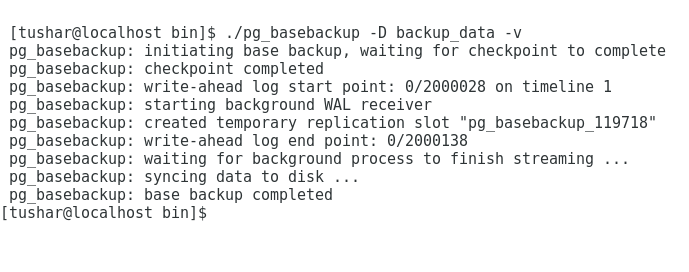
Perform pg_basebackup ( to perform online full backup )


Scenario is -
at X time- User has dropped all the rows  = count is 0 rows
at Y time- User has inserted  50 rows =count is 50 rows
at Z time- User has inserted 1 lakh rows =count is 1 lakh 50  rows

We want to  perform recovery at Y time  where count is 50 rows.


at X time -

at Y time -


at Z time - 


X time =2019-09-10 17:53:13
Y time =2019-09-10 17:55:48
Z time =2019-09-10 17:58:05


Now, Time to perform recovery till Y time

Stop the  Server (./pg_ctl -D my_data stop -m i)
Go to folder - backup_data (full backup ,which we have taken earlier)
Open postgresql.conf file and add these below GUC parameters


Recovery is now (in v12) initialised by a file called 'recovery.signal'  - empty file need to be create manually in data directory folder .


Start the server -


recovery.signal file has been automatically removed from data folder .
Connect to psql terminal and check the data


Data has been recovered till Y point . 

Friday, September 6, 2019

How to install PostgreSQL using YUM

Installing any software using YUM is one of the easiest way where it will resolve all the dependencies . YUM is a  command/utility for installing/updating/deleting RHEL (and family like CENTOS/FEDORA)  RPM software packages as well as third party repositories in one single command.

YUM( Yellowdog Updater Modified) V/s RPM (Redhat Package Manager)
YUM is nothing but an another way to install RPMs , it  resolve dependencies easily ,connect to online repositories and can update software whereas with using RPMs -it is not quite easily  possible but advantage of installing using RPMs is that we don't need internet connection but in case of YUM- we cannot do without net.

Installation of PostgreSQL using YUM
============================
Go to yum.postgresql.org webpage (https://yum.postgresql.org/repopackages.php)
We are on Centos 7 64 bit machine , so need to look for repository  package  for  Centos 7-x86_64
Click on "Centos 7 -x86_64"

a file called pgdg-redhat-repo-latest.noarch.rpm -  will be downloaded


Connect to Root user (YUM command cannot be fire from non root user)

Install RPM package using rpm -ivh command


under /etc/yum.repos.d , a file will be created


Open this file and enable - whatever PostgreSQL server version you are looking , in this case - i have enabled PG v11 and rest all others are disabled


Before installing PG , we need to make sure epel-release package is installed on Centos 7.X machine
On my system , it is installed otherwise i need to fire 'yum install epel-release'


EPEL - Extra package for Enterprise Linux  (epel-release) is a open source community repository project which provide adds-on software which is required to install PG successfully. 

Perform yum clean all and yum make cache 

yum clean all -clean all the old cache 
yum makecache -is used to download and make usable all the metadata for the currently enabled yum repos


Time to install PG v11

yum install postgresql1-server


Press 'Y'


PG v11 is installed successfully on machine

rpm -ql <package name> - we can know the location  from where the files have copied


Initialise the Cluster -

Start the Service - 

check the status -


Connect to psql terminal -


Wednesday, September 4, 2019

Is setting logical replication easy in PostgreSQL ?

Well, Yes but before setting  logical replication , first thing we need to understand is  -
What is streaming replication(SR) ?
What is the difference between physical replication V/s logical replication ?

Streaming replication - gives you the power to continue send the WAL(Write ahead logs) records to the Slaves so that it can be in SYNC and if something unexpected  happened to master
for instance - if its goes down / Data Centre where Master hard disk stored hit by earthquake  , SLAVE can become the saviour and save the world. For more details please refer -PG Wiki

Logical replication - is a method to replicate the data  using replication identity whereas Physical replication is a method to replicate data using byte to byte replication. The advantage of logical replication is that here is no need to replicate ALL the tables but we can select only few specified which we want to replicate also in logical replication - we need not to create Master/Slave relation where Slave is read-only till the time it get promoted in the event of master down.

In logical replication - We have Publication and Subscription mechanism where Publication from where we are taking the data and Subscription -from where we are replicating  it.

Steps by Steps to Setup logical replication  on two database clusters-
================================================
.) PG v12 Beta 3 Sources on Centos 7
.)Perform initdb , change wal_level=logical in postgresql.conf file , start the server and connect to psql terminal  ,Create one table


.)Perform another initdb , start the server and connect to psql terminal  ,create table 'test' (same which we have created in cluster1) - here there is no need to change wal_level.

Case 1-


.) Create Publication on Cluster1 -by default  using option 'all tables'  which means all the tables will be published.


.)Create Subscription on Cluster2

.)logical replication slot is created on cluster1


logical replication service is started in the background


Time to insert data on Cluster1 . data will be replicated in cluster2


If we want to update/delete data from cluster1 then we need to set replica identify using alter table command.

Case 2 - When we want to  publish  few tables out of X tables 

Lets assume  - We have 5 tables in cluster1 (e.g Table - Table1,Table2,Table3......Table3) and now we only want to publish first 3 tables 


Connect to cluster2 and first create the tables which we want to subscribe from cluster1 and then create subscription .. if table doesn't exists then create subscription will fail , for ex- 


Create Table3 and now subscription which is based on publication pub will be created successfully 


Insert on table1/table2 which is on Cluster1 .. data will be replicated on Cluster2 side as well ..


Thursday, August 29, 2019

How to run PostgreSQL on Docker ?

Docker is a Open source tool/platform where we can create/deploy/run application by using containers.Docker is similar to VM but in VM - one need to create virtual operating system but in case of Docker  -it will allow applications to use system kernel where it is running on.

PostgreSQL community supports PG (v9,4,v9,5,v9.6,v10,v11 e.t.c) Images
The difference between images and container is -
Image is nothing but a template of instructions and  an instance of an image is called Container.

so here is what is what -
================
Docker- is a tool/platform.
Image- is an application which we want to create/deploy  e.g In this case we want to deploy  PG v11.5(latest released as on 28th/Aug/2019)  Image.
Container - Running instance of an image (template of instructions) .

Steps by Steps guide to deploy PostgreSQL image on Docker 
============================================
0. Centos 7 64 bit machine
1.Go to  https://hub.docker.com/
2.Create a login account (Sign up)


After Pressing continue -it will ask you - your  first name/last name /your profile  and  some other crap questions.  - Press Continue - it will further ask you to check your inbox and click on "Confirm your email with Docker "  , Once you done that -
Congrats - You are registered on the site and your DockerID is created.

Sign up time -


First thing ,We need to install docker on machine , right now it is not installed locally on my Centos 7


3.To install Docker Enterprise(EE) , Please follow this link - 

Otherwise , just  install Docker CE(Community edition) by using yum command 


Open a command line terminal and start the docker daemon service -


4.Go to https://hub.docker.com and write 'postgres' in search box 


All the official PG server images can be found that and on the right hand side, there is a command to pull the image i.e "docker pull postgres" , copy it .


5.Open a command line terminal and paste command - "docker pull postgres"


OR


if we want PG v11.5 then we need to specify the tag explicitly i.e 


Currently latest is 11.5 only so both are same.

6.Run "docker run" command which is used to launch container 


7.Run "docker ps" command which shows status of container and all required information 


8.Run "docker exec" command which is used to login to the container

Here, if we see - We are not only able to login to the container but also login to PG v11.5 server 

9.Remove the  container once you are done !


Hope this helps!

I would like to  thanks my colleague Mr.Jitendra Wadle for all his help and assistance.  


Tuesday, August 27, 2019

Where is my recovery.conf file in PostgreSQL v12 ?

Well the short answer is - it has gone.
From PostgreSQL v12 - 'recovery.conf' is no more valid and even if someone create a recovery.conf file manually and keep under  data  directory -Server is not going to start - will throw this below error


Parameter  'standby_mode =on' is also removed from PG v12 which used to be #1 parameter of recovery.conf file also trigger_file parameter name is changed to promote_trigger_file.
Other parameters which we usually  mention in the recovery.conf is valid and can be write in the postgresql.conf file of SLAVE cluster.  

It is actually make more sense if all the  required information is mentioned in one file i.e  postgresql.conf rather than creating/managing separate files.

standby.signal which is a empty file has replace recovery.conf file and presence of this file will signal the cluster to run in standby mode.

Step by Step guide to setup SR in PG v12 and Failover
=======================================
1)PG v12 server is up and running -  only modified 2 parameters in the postgresql.conf file of master cluster


archive_mode  = Whether to send  WAL files for archive storage or not
archive_command = Where to send i.e location

2)Create Standby/Slave using pg_basebackup  with option -R 


pg_basebackup utility  is for to take the backup online.There is an another method as well where we can fire - select pg_start_backup('My backup..'); in master cluster to start the online backup and then using cp command take the backup and later fire - select pg_stop_backup(); to signal the master server that online backup is finish but again manual intervention is required i.e remove postmaster.pid /create recovery.conf file (or from PG v12 - create standby.signal) in slave directory  so better to use pg_basebackup only which take care of everything.

-R option will create a empty file with the name- standby.signal .


3)Old recovery.conf file ( taken from PG v10)


if we just copy all these above parameters in the postgresql.conf file of slave cluster . Server is going to throw this below error - 


As standby_mode parameter is no more supported and trigger_file is rename to promote_trigger_file -server is failed to start . just Correct both these - Server will start. 


4)Verify SR setup is properly working


Perform - Failover - 
There are multiple ways -
a)shut down the master and promote standby.
b)Shut down the master and touch the file which we mentioned in postgresql.conf in promote_trigger_file parameter.

In this case - using option b) 


standby.signal file has gone from slave/ data directory. Slave is now new Master and able to perform DDL operations.